База знань › Gateways / Data Loggers
PUSR (Jinan USR IOT Technology Limited) USR-DR302
Manufacturer documented GLOBAL
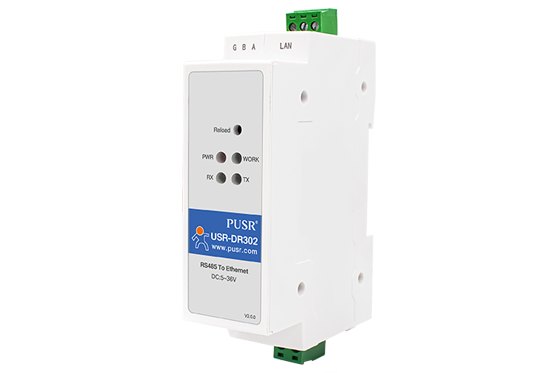
Identity
| category | gateways |
| manufacturer | PUSR (Jinan USR IOT Technology Limited) |
| manufacturer_part_number | USR-DR302 |
| model | USR-DR302 |
| mpn | USR-DR302 |
| product_family | USR-DR301/DR302 |
| product_status | active |
| region | GLOBAL |
| series | USR-DR |
| variant | — |
Electrical
| baud_rate_range |
600-460.8K (bps)
USR-DR302 — official product page — Specifications, row 'Serial Port Baud rate'
|
| default_baud_rate |
115200 bps
USR-DR302 User Manual — 'Form 1.3-1 Default Parameters'
|
| default_local_port |
0
USR-DR302 User Manual — 'Form 1.3-1 Default Parameters', row 'Default local port of port'
|
| default_password |
admin
USR-DR302 User Manual — Form 1.3-1
|
| default_remote_ip |
192.168.0.201
USR-DR302 User Manual — Form 1.3-1
|
| default_remote_port |
8324
USR-DR302 User Manual — Form 1.3-1
|
| default_username |
admin
USR-DR302 User Manual — Form 1.3-1 Default Parameters
|
| default_work_mode |
TCP Client
USR-DR302 User Manual — 'Form 1.3-1 Default Parameters', row 'Default work mode of port'
|
| isolation |
1.5KV
USR-DR302 — official product page — Specifications, row 'Grade' ('IP30, 1.5KV')
|
| power_consumption |
130mA@5V
USR-DR302 — official product page — Specifications, row 'Work Current'
|
| power_input |
DC 5.0~36.0 V
USR-DR302 — official product page — Specifications, row 'Work Voltage'
|
| rfc2217_similar |
Support
USR-DR302 — official product page — Specifications, row 'Similar RFC2217 Support'
|
| work_modes |
TCP Server / TCP Client / UDP Server / UDP Client; Modbus RTU to TCP
USR-DR302 — official product page — Specifications, row 'Work Mode'
|
Physical / mechanical
| dimensions |
71.0 x 60.0 x 25.0 mm
USR-DR302 — official product page — Specifications, row 'Size'
|
Installation
| mounting |
DIN rail
USR-DR302 — official product page — product title and category 'DIN-Rail'
|
Environment
| ip_rating |
IP30
USR-DR302 — official product page — Specifications, row 'Grade'
|
| operating_temperature |
-40 ~ 85 degC
USR-DR302 — official product page — Specifications, row 'Work Temp'
|
Interfaces & connectors
| configuration_methods |
Software, Web-page, AT command
USR-DR302 — official product page — Specifications, row 'Configuration'
|
| default_gateway |
192.168.0.1
USR-DR302 User Manual — 'Form 1.3-1 Default Parameters'
|
| default_ip_address |
192.168.0.7
USR-DR302 User Manual — 'Form 1.3-1 Default Parameters'
|
| default_serial_frame |
None/8/1 (parity/data/stop)
USR-DR302 User Manual — 'Form 1.3-1 Default Parameters', row 'Parity bit/Data bit/Stop bit'
|
| default_serial_parameters |
115200, None/8/1
USR-DR302 User Manual — Form 1.3-1
|
| default_subnet_mask |
255.255.255.0
USR-DR302 User Manual — 'Form 1.3-1 Default Parameters'
|
| default_web_password |
admin
USR-DR302 User Manual — 'Form 1.3-1 Default Parameters'
|
| default_web_username |
admin
USR-DR302 User Manual — 'Form 1.3-1 Default Parameters'
|
| device_type | DIN-rail 1-port RS485 serial device server / Modbus RTU-TCP gateway |
| ethernet_ports |
RJ45, 10/100Mbps
USR-DR302 — official product page — Specifications, row 'Ethernet Port'
|
| home_assistant_modbus_tcp_suitable | True |
| home_assistant_suitability_basis | Documented protocol conversion. The USR-DR302 User Manual states 'Modbus RTU and Modbus TCP: Modbus serial protocol to Modbus network protocol can be converted by Opening the Modbus TCP to Modbus RTU function in the web page', with the device 'in the TCP server or the TCP client mode'; the product page's 'Work Mode' row ends '...UDP Client Modbus RTU to TCP'. With a single isolated-rail RS485 port, DIN-rail mounting, IP30 and -40 to 85 degC this is the most natural Home Assistant fit in the DR family. Two configuration cautions: the Modbus TCP-to-RTU option is OFF at the factory, and the factory default work mode is TCP Client with local port 0, so the unit must be switched to TCP Server before a Modbus TCP client can connect to it. PUSR publishes no default Modbus TCP port number. |
| httpd_client |
Support
USR-DR302 — official product page — Specifications, row 'httpd Client Support'
|
| modbus_gateway |
Modbus RTU and Modbus TCP: Modbus serial protocol to Modbus network protocol can be converted by Opening the Modbus TCP to Modbus RTU function in the web page
USR-DR302 User Manual
|
| modbus_gateway_mode |
Modbus serial protocol to Modbus network protocol can be converted by Opening the Modbus TCP to Modbus RTU function in the web page
USR-DR302 User Manual — Modbus RTU and Modbus TCP section
|
| modbus_register_map_available | False |
| modbus_register_map_note | no register map in the DR302 manual |
| network_protocols |
TCP/IP, UDP, ARP, ICMP, IPV4
USR-DR302 — official product page — Specifications, row 'Network Protocol'
|
| rs232 |
false
USR-DR302 — official product page — Specifications, row 'Serial Port' states RS485*1 only
|
| rs485 |
true
USR-DR302 — official product page — Specifications, row 'Serial Port'; confirmed in the manual's hardware parameters ('RS485*1')
|
| serial_ports |
RS485*1
USR-DR302 — official product page — Specifications, row 'Serial Port'
|
| tcp_server_max_clients |
8 clients
USR-DR302 — official product page — Specifications, row 'TCP Server Connection Support'
|
Protection
| hardware_protection |
Level 4 anti-static, level 3 electrical pulse protection, level 2 surge protection
USR-DR302 — official product page — Specifications, protection row
|
Certifications
| certifications |
CE, RoHS, FCC
USR-DR302 — official product page — Specifications, row 'Certificate'
|
Документи
product-page
USR-DR302 — official product page
technical-manual
USR-DR302 User Manual