Knowledge Base › Gateways / Data Loggers
Victron Energy Venus GX
Official manufacturer global verified Sept. 2, 2026
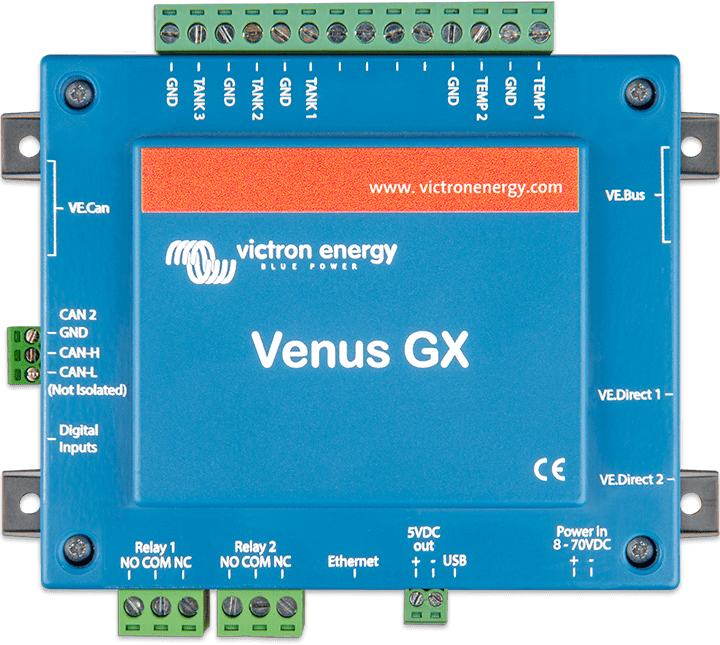
Identity
| category | gateways |
| cpu | UNKNOWN |
| manufacturer | Victron Energy B.V. |
| model | Venus GX |
| operating_system | Venus OS |
| product_family | GX (Venus OS communication centre / system monitoring) |
| product_status | superseded |
| product_status_statement | For new installs, we recommend the equally priced yet far more powerful Cerbo GX. |
| ram | UNKNOWN |
| region | global |
| sku | UNKNOWN |
Electrical
| current_draw | 210 mA @ 12V / 110 mA @ 24V / 60 mA @ 48V |
| five_v_output | UNKNOWN |
| power_consumption_w | UNKNOWN (stated as current draw only) |
| pv_mppt_capability | none - monitoring/control gateway only |
| supply_voltage_range_v | 8 - 70V DC |
Physical / mechanical
| dimensions_h_w_d_mm | 45 x 143 x 96mm |
| display | no display |
| enclosure_material | UNKNOWN |
| weight | UNKNOWN |
Installation
| mounting | Wall mounting |
Environment
| humidity | UNKNOWN |
| operating_temperature_range_c | -20 to +50°C |
Interfaces & connectors
| bluetooth | UNKNOWN |
| digital_inputs | UNKNOWN |
| ethernet | 10/100/1000MB RJ45 socket – isolated except shield |
| modbus_tcp | Yes - Modbus-TCP is a feature on all our GX devices eg Cerbo GX, and Venus GX; disabled by default |
| mqtt | UNKNOWN |
| relay_outputs | Potential free contact relay: NO/COM/NC – 6 A 250 VAC/30 VDC |
| remote_console | Yes |
| second_can_interface | 2nd CAN interface – non-isolated |
| supported_protocols | VE.Bus, VE.Direct, VE.Can, CAN, Modbus-TCP, NMEA 2000 |
| tank_level_inputs | 3 x Configurable for European (0 - 180 Ohm) or US (240 - 30 Ohm) |
| temperature_inputs | 2 (requires ASS000001000) |
| usb_ports | 2 USB Host ports – not isolated |
| ve_bus_ports | 2 paralleled RJ45 sockets – isolated |
| ve_can_ports | 2 paralleled RJ45 sockets – isolated |
| ve_direct_ports | 2 separate VE.Direct ports – isolated |
| vrm | Yes |
| wifi | WiFi Access Point (use to connect to Remote Console) and WiFi Client; 2.4GHz Wifi | Range: 2.412 - 2.462GHz | 88.1mW |
| wifi_note | The built-in WiFi in the Venus GX has a very low signal strength - unfortunately. It is strong enough to connect to a phone, tablet or laptop in order to access setup and monitoring. But to connect the Venus GX to the internet either use the built-in Ethernet port or add a USB-WiFi dongle. |
Protection
| ip_rating | UNKNOWN |
Certifications
| standards | ['Safety standard: EN 60950-1:2005+A1:2009+A2:2013', 'EMC standard: EN 61000-6-3, EN 55014-1, EN 61000-6-2, EN 61000-6-1, EN 55014-2', 'Automotive: In progress (per Venus GX manual technical specifications)'] |
Warranty & service
| summary | 5-year standard warranty |
Documents
datasheet
{# Located but never retrieved: listed, but deliberately not linked, and it
backs no stored value. #}
Venus GX Datasheet (PDF) — located, not retrieved
user-manual
GX Modbus-TCP Manual
user-manual
Venus GX official product page
Recorded conflicts
certifications (Automotive) Review required
Automotive | In progress — Venus GX Manual, Technical specifications
Certificate Automotive ECE R10-6 - Venus GX (certificate PDF published on the Venus GX product page) — Venus GX official product page, Certificates section
Additional documented parameters
Recorded verbatim from the source; no schema field exists for these yet.
| Venus GX manual | WiFi Client | Connect the Venux GX to an existing WiFi network |
| documented_relationship:gateway_device | {"to_manufacturer": "Victron Energy", "to_model": "MultiPlus / Quattro / VE.Bus inverter-chargers", "relationship_type": "gateway_device", "bus": "VE.Bus", "source": "Ekrano GX / Venus GX / Cerbo GX / Cerbo-S GX Manual, 5.1", "source_url": "https://www.victronenergy.com/media/pg/Cerbo_GX/en/connecting-victron-products.html", "confidence": "officially-verified"} |
| footnote 13 | The 5V output on the Venus GX can be used to power, for example, a USB hub. Note that its output is not current limited or otherwise protected, and it shares the internal power supply in the Venus GX: overdrawing from it will result in shutdown(s) of the Venus GX. It is recommended to install a fuse for prevention. |
| footnote 22 | The digital inputs on the Ekrano GX, Cerbo GX MK2 and Venus GX can also be used for pulse counting. |
| footnote 3 | Make sure the Venus GX is running v2.06 or later - early shipments of Venus GX units ran v2.05. |