Knowledge Base › Gateways / Data Loggers
Victron Energy Cerbo GX
Official manufacturer GLOBAL verified Sept. 25, 2026
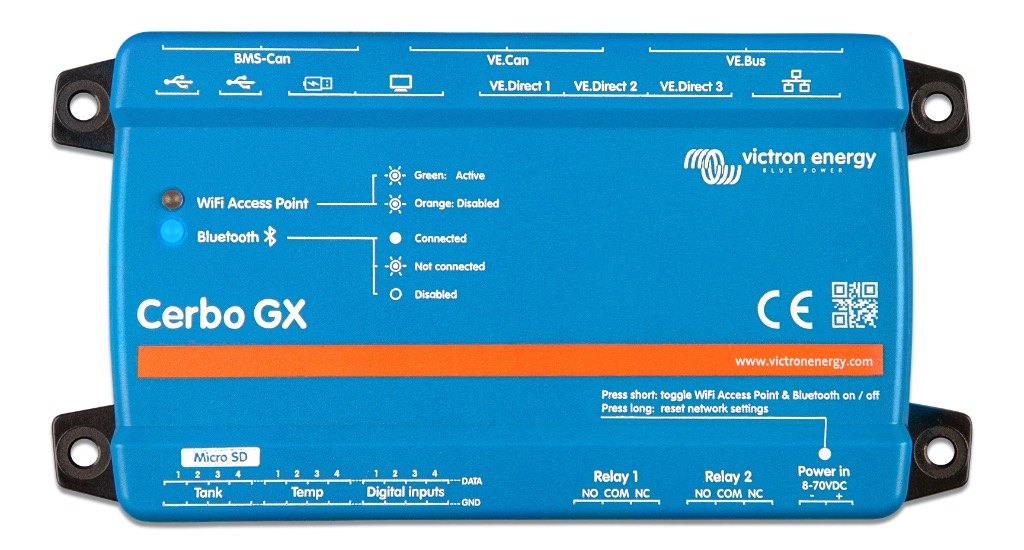
Identity
| category | gateways |
| cpu | dual core |
| generation | first generation Cerbo GX |
| manufacturer | Victron Energy B.V. disputed |
| model | Cerbo GX |
| operating_system | Venus OS |
| product_family | GX (Venus OS communication centre / system monitoring) |
| product_status | active |
| ram | — |
| region | global |
| sku | BPP900450100 |
Electrical
| battery_backup_clock | — |
| five_v_output | — |
| official_product_url |
https://www.victronenergy.com/communication-centres/cerbo-gx
GX (Venus OS communication centre / system monitoring) — Victron Energy product page
|
| power_consumption_range_w | 2,5 to 5 W |
| power_consumption_w | around 2.8W without GX Touch mounted; 3.8W with GX Touch connected and backlight off; 4.8W with backlight at max intensity |
| product_status |
active
GX (Venus OS communication centre / system monitoring) — Victron Energy product page
|
| pv_mppt_capability | none - this is a monitoring/control gateway, not a charge controller or inverter |
| supply_fuse | inline 3.15 A slow-blow fuse included in supplied DC power cable |
| supply_voltage | 100-240 V AC |
| supply_voltage_range_v | 8 - 70V DC |
Physical / mechanical
| dimensions_h_w_d_mm | 78 x 154 x 48 mm |
| display | no built-in display; optional GX Touch 50 or GX Touch 70 touch display connects via HDMI + USB |
| enclosure_material | — |
| weight | — |
Installation
| mounting | Wall or DIN rail (35mm) |
| mounting_note | DIN rail mounting requires additional accessory - DIN35 Adapter |
| power_in_port | Power in port (8 - 70VDC) |
Environment
| humidity | — |
| operating_temperature_max_c | 60.0 |
| operating_temperature_min_c | -25.0 |
| operating_temperature_range_c | -20 to +50°C |
Interfaces & connectors
| bluetooth | Bluetooth Smart - 2.402 - 2.48GHz | 5.2mW |
| bms_can_port | Yes |
| digital_input_electrical | Inputs are non-isolated. Each input includes an internal 10 kΩ pull-up resistor to 3.3 V. Can safely withstand input voltages up to 5 V. |
| digital_inputs | 4 (no pulse counting - Pulse Meter function is not supported on the first-generation Cerbo GX) |
| ethernet | 10/100 RJ45 socket |
| hdmi | HDMI port |
| interfaces | VE.Direct, VE.Can, Ethernet, Wi-Fi, USB, Digital Inputs |
| microsd | MicroSD Card Slot (max. 32GB) |
| modbus_tcp | Yes - disabled by default; enabled in settings menu under 'Services' |
| mqtt | Yes - listed as a Settings -> Integrations item in the GX manual |
| relay_outputs | 2 x NO/NC; DC up to 30VDC: 6A; DC up to 70VDC: 1A; AC: 6A, 125VAC |
| remote_console | Yes - via HTTPS webserver login page |
| supported_devices_max | 32 |
| supported_protocols | VE.Bus, VE.Direct, VE.Can (250 kbit/s), BMS-Can (500 kbit/s), Modbus-TCP, MQTT, NMEA 2000, RV-C, Marine MFD app integration, SSDP/DNS-SD, mDNS (venus.local), DHCP/DNS on WiFi AP |
| tank_level_inputs | 4 resistive; each configurable for European (0 - 180 Ohm), US (240 - 30 Ohm) or custom 0-300 Ohm |
| temperature_inputs | 4 (requires ASS000001000 Temperature Sensor QUA/PMP/Venus GX; range -40°C to +70°C) |
| usb_note | On the Cerbo GX, the USB socket closest to the HDMI connector can only be used to power a GX Touch. That USB port can not be used for any data-related functions |
| usb_ports | 2x USB Host ports + 1x USB Power only port |
| ve_bus_ports | 1 VE.Bus (2 paralleled RJ45 sockets) |
| ve_can_isolation | VE.Can non-isolated |
| ve_can_ports | 1x VE.Can (non-isolated) and 1x BMS-Can |
| ve_can_termination | VE.Can network must be terminated at both ends using VE.Can terminator (terminators not stated as supplied with the GX device) |
| ve_direct_ports | 3 (max. possible VE.Direct devices: 15) |
| vrm | Yes - VRM Portal data logging, default log interval 15 minutes (settable 1 minute to 1 day) |
| wifi | WiFi 2.4GHz (802.11 b/g/n) incl. WiFi Access Point | Range: 2.412 - 2.462GHz | 88.1mW |
Protection
| ip_rating | IP20 |
Certifications
| standards | ['Safety: IEC 62368-1', 'EMC: EN 301489-1, EN 301489-17', 'Automotive: ECE R10-6'] |
Warranty & service
| summary | 5-year standard warranty |
Documents
datasheet
{# Located but never retrieved: listed, but deliberately not linked, and it
backs no stored value. #}
Cerbo GX & GX Touch Datasheet (PDF) — located, not retrieved
installation-manual
Cerbo GX Manual - 3. Installation (HTML5)
user-manual
Cerbo GX Manual - 17. Digital Inputs (HTML5)
user-manual
Cerbo GX Manual - 9. Configuration (HTML5)
user-manual
GX Modbus-TCP Manual
Recorded conflicts
identity.manufacturer Review required
Victron Energy B.V. — stored value
Victron Energy — incoming package
Detected during import wave6-2026-09-batch11
identity.manufacturer Review required
Victron Energy B.V. — stored value
Victron Energy — incoming package
Detected during import v1-freeze-2026-09-batch06
identity.manufacturer Review required
Victron Energy B.V. — stored value
Victron Energy — incoming package
Detected during import v1-freeze-2026-09-batch06
identity.manufacturer Review required
Victron Energy B.V. — stored value
Victron Energy — incoming package
Detected during import system-topology-2026-09-batch01
Additional documented parameters
Recorded verbatim from the source; no schema field exists for these yet.
| Communication Services (table 21.3) | HTTP webserver = Landing page to forward a user to the HTTPS login / Remote Console page; HTTPS webserver = Login page and Remote Console; MQTT via websockets = Data exchange between GX device and Remote Console; DHCP (on WiFi AP); DNS (on WiFi AP); SSDP / DNS-SD = Make the GX device automatically detectable on the network; mDNS = Make the GX device reachable under the name venus.local |
| Modbus-TCP Unit-ID | Note that both Unit-ID 0 and Unit-ID 100 map to the same internal address. We recommend to use ID 100, since many Modbus-TCP clients and PLCs do not work with ID 0. |
| Modbus-TCP register list | https://www.victronenergy.com/upload/documents/CCGX-Modbus-TCP-register-list-3.73.xlsx |
| Second CAN bus interface | BMS-Can only |
| builder_completeness | partial |
| documented_relationship:gateway_device | {"to_manufacturer": "Victron Energy", "to_model": "MultiPlus / Quattro / VE.Bus inverter-chargers", "relationship_type": "gateway_device", "bus": "VE.Bus", "source": "Cerbo GX Manual 5.1 VE.Bus Multis/Quattros/Inverters", "source_url": "https://www.victronenergy.com/media/pg/Cerbo_GX/en/connecting-victron-products.html", "confidence": "officially-verified", "locator": "Connect to either VE.Bus port on the GX device. Use standard RJ45 UTP cable."} |
| documented_relationship:monitors | {"to_manufacturer": "Multiple third-party", "to_model": "Fronius / SMA / ABB-FIMER / SolarEdge PV inverters", "relationship_type": "monitors", "bus": "Modbus TCP over Ethernet/WiFi", "source": "Victron GX product range - Third party compatibility", "source_url": "https://www.victronenergy.com/live/venus-os:start", "confidence": "officially-verified"} |
| footnote 15 | A BMS-Can port is a port dedicated to only be used for connecting managed batteries, such as Freedomwon, BYD, Pylontech, BlueNova, MG Energy Systems and others. It is not possible to connect Victron VE.Can products to that port. ... The baudrate of a BMS-Can port is fixed to 500kbps. |
| footnote 17 | the Bluetooth function in the Cerbo GX stops working when the internal temperature is too high. This applies for Cerbo GX units built up to and including serial number HQ2207. Units manufactured later (HQ2208 and later) do not require an additional USB Bluetooth adapter. |
| footnote 7 | The programmable relay can be set to act as an alarm relay, automatic genset start stop, or an on/off switch, and is controlled via the GUI and/or ModbusTCP. |
| footnote 8 | Relay 1 can be used for programming as an alarm relay, generator start/stop, tank pump, temperature controlled relay or manual operation. Relay 2 is available for programming as a temperature controlled relay or manual operation in the Relay menu of the GX (requires firmware 2.80 or higher). |